So sehen Sie, wie Ihr Auto mit einem Bodykit aussieht – vor dem Kauf
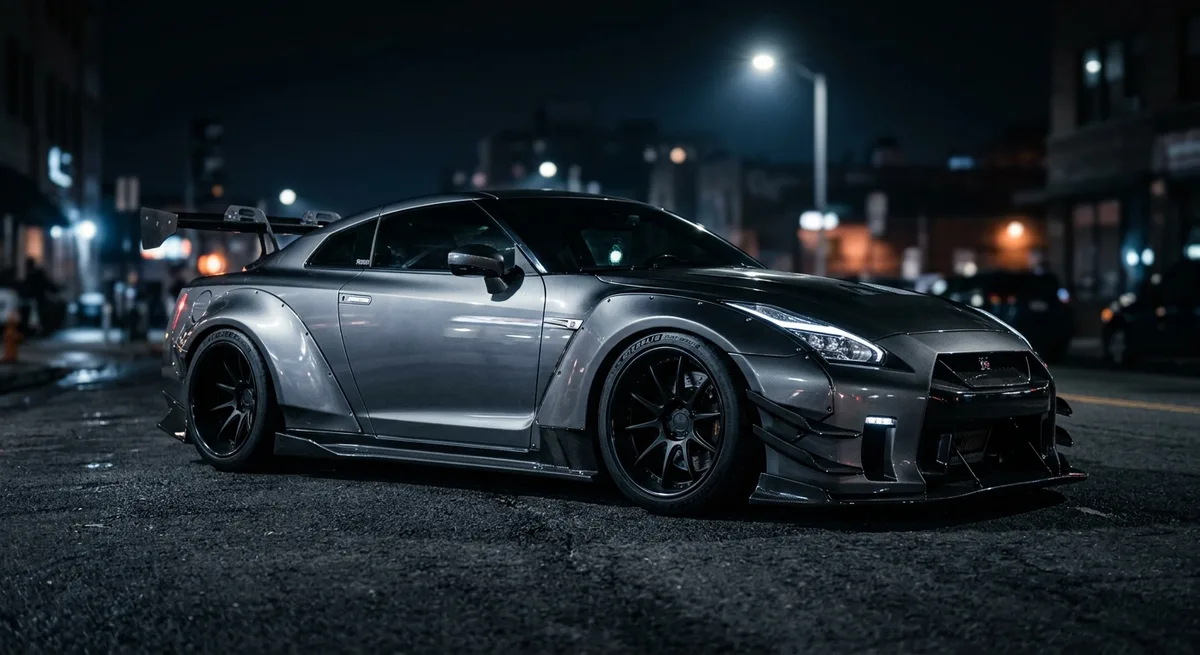
Ein Bodykit ist eine der tiefgreifendsten Modifikationen, die Sie an einem Auto vornehmen können – und eine der teuersten und am schwersten rückgängig zu machenden. Zwischen dem Kit selbst, passendem Lack oder Folierung und professioneller Montage kann ein kompletter Umbau Tausende kosten. Das Schlimmste wäre, all das auszugeben und dann festzustellen, dass der Look nicht zu Ihrem Auto passt.
Früher verließ man sich auf die Vorstellungskraft: Man starrte auf Fotos von Umbauten anderer und versuchte, sich das Ergebnis an der eigenen Marke und Farbe vorzustellen. Das funktioniert selten, denn Proportionen, Stance und Lack verändern alles. Der zuverlässige Weg heute ist, das Kit auf einem Foto Ihres echten Autos anzusehen.
Warum eine Vorschau besser ist als Vorstellungskraft
Karosserielinien sind spezifisch. Ein Widebody, der an einem Coupé aggressiv aussieht, kann an einer Limousine seltsam wirken; eine Frontlippe, die an einer Stoßstange sauber abschließt, kann mit einer anderen kollidieren. Wenn Sie das Kit auf Ihrem eigenen Auto gerendert sehen – Ihr Lack, Ihre Fahrzeughöhe, Ihre Felgen – wird aus einer abstrakten Wette ein klares Ja oder Nein.
So sehen Sie ein Bodykit mit Car AI in der Vorschau
Car AI erledigt das in drei Schritten. Laden Sie ein klares Seiten- oder Dreiviertelfoto Ihres Autos hoch, wählen Sie Bodykits (oder ein bestimmtes Teil wie einen Frontsplitter, Seitenschweller oder einen Heckdiffusor), und die App rendert die Modifikation in Sekundenschnelle fotorealistisch auf Ihr Auto. Sie können ein dezentes Aero-Update oder einen kompletten Widebody ausprobieren und dies mit neuen Felgen und einer Farbänderung kombinieren, um den kompletten Umbau zu entwerfen.
Betrachten Sie das Ergebnis als Styling-Referenz und nicht als technische Spezifikation – tatsächliche Kits variieren je nach Marke und Passgenauigkeit. Aber als eine Möglichkeit, eine Richtung festzulegen und einen teuren Fehler zu vermeiden, ist es unschlagbar.
Ein schneller Workflow
Beginnen Sie mit dem ganzen Kit, um den Gesamt-Stance zu beurteilen. Probieren Sie dann einzelne Teile aus, um zu sehen, welche die Hauptarbeit leisten. Vergleichen Sie zwei oder drei Optionen nebeneinander, wählen Sie einen Gewinner und nehmen Sie dieses Bild als klare Vorgabe mit zu Ihrem Monteur. Sie werden ein viel besseres Gespräch führen – und eine viel größere Chance haben, das Ergebnis zu lieben.